 Vocal Euphoria
Voice studio · East York, Toronto
Book
Vocal Euphoria
Voice studio · East York, Toronto
Book
Let's get you ready for your session
Find your service below.
MasterClass
Up to six performers, two pieces each, a live musician and an audience. Two hours at Kimbourne Park United Church, 1:30–3:30pm.
Cancellation and etiquette
Sheet Music Guide for BeginnersEight steps, about 20 minutes
Eight steps to choosing and preparing sheet music on Musicnotes, one small task at a time. You do not need to understand music theory.
Start here: finding your song
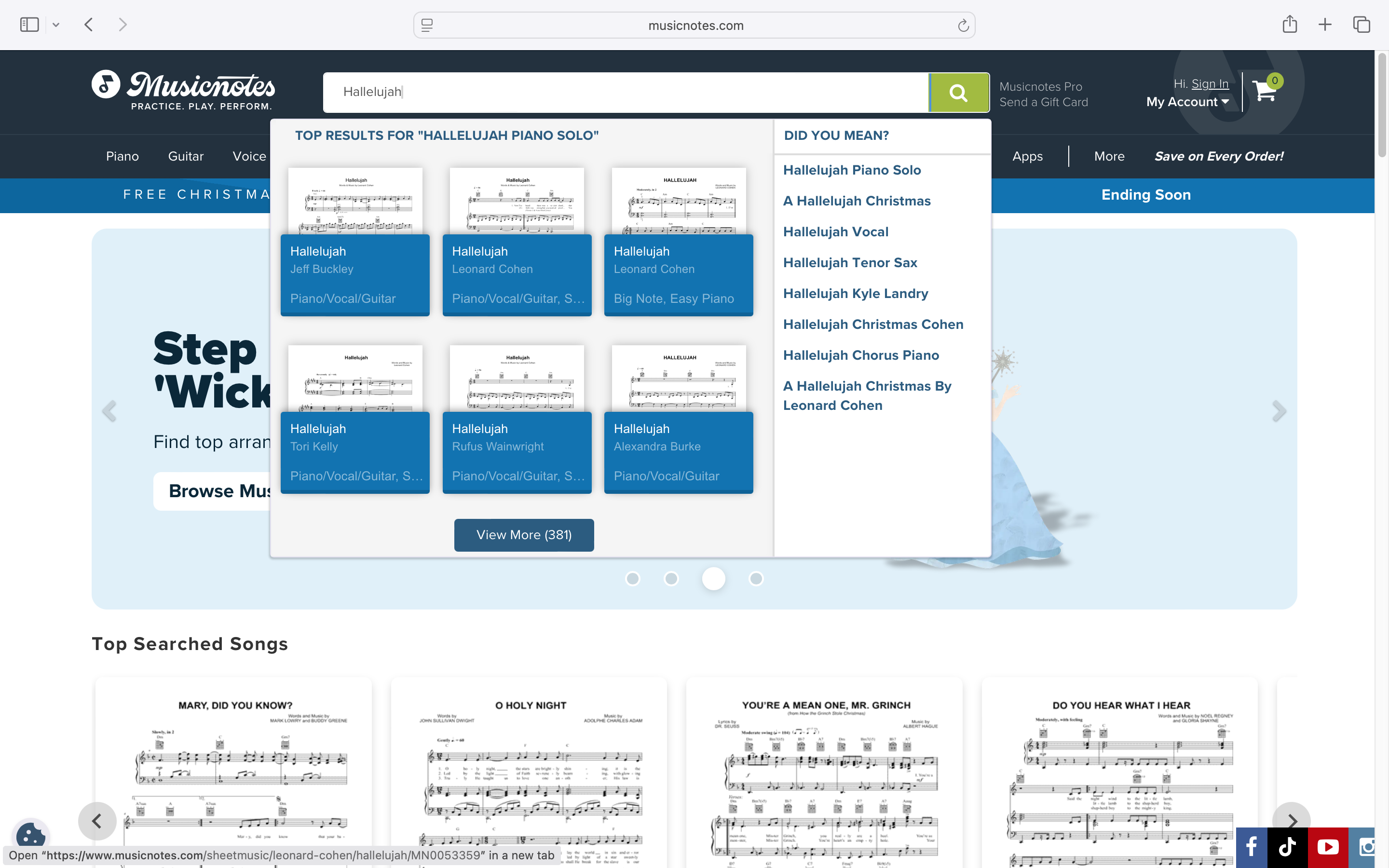
When searching on Musicnotes, use both the song title and the artist name. This helps you select the correct version of the song.
You should see:
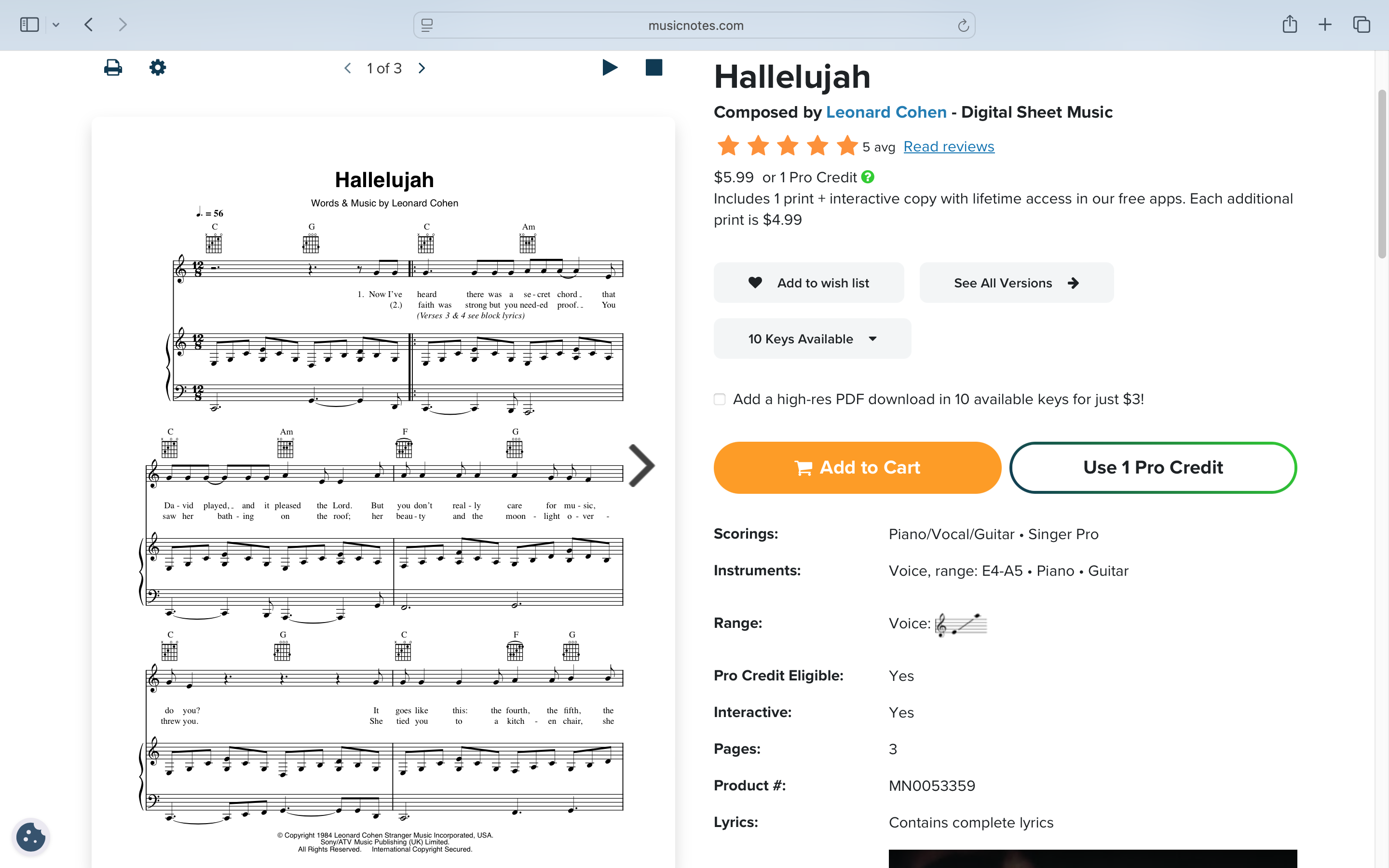
the song title the composer or songwriter a preview image of the sheet musicIf the title and artist match the song you want, you’re on the correct page.
Choosing the correct format
Look for the section that lists the format or scoring.
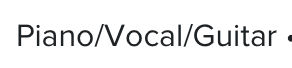
You should see: Piano/Vocal/Guitar
This is the format you want. It works for singers, pianists, and guitarists.
If you see other formats, choose Piano/Vocal/Guitar.
Using the audio preview
Use the play button on the page to listen to the song.
The audio on Musicnotes is a simple vocal guide. It helps you hear the melody and know which notes to sing.
The preview helps you:
confirm you chose the correct version of the song try different keys get a general feel for the melodyAfter you purchase the sheet music, you will be able to play the entire song and sing along from start to finish.

Choosing a key (simple explanation)
A key simply means how high or low the song is.
Changing the key does not change the song. It only changes where the notes sit in your voice.
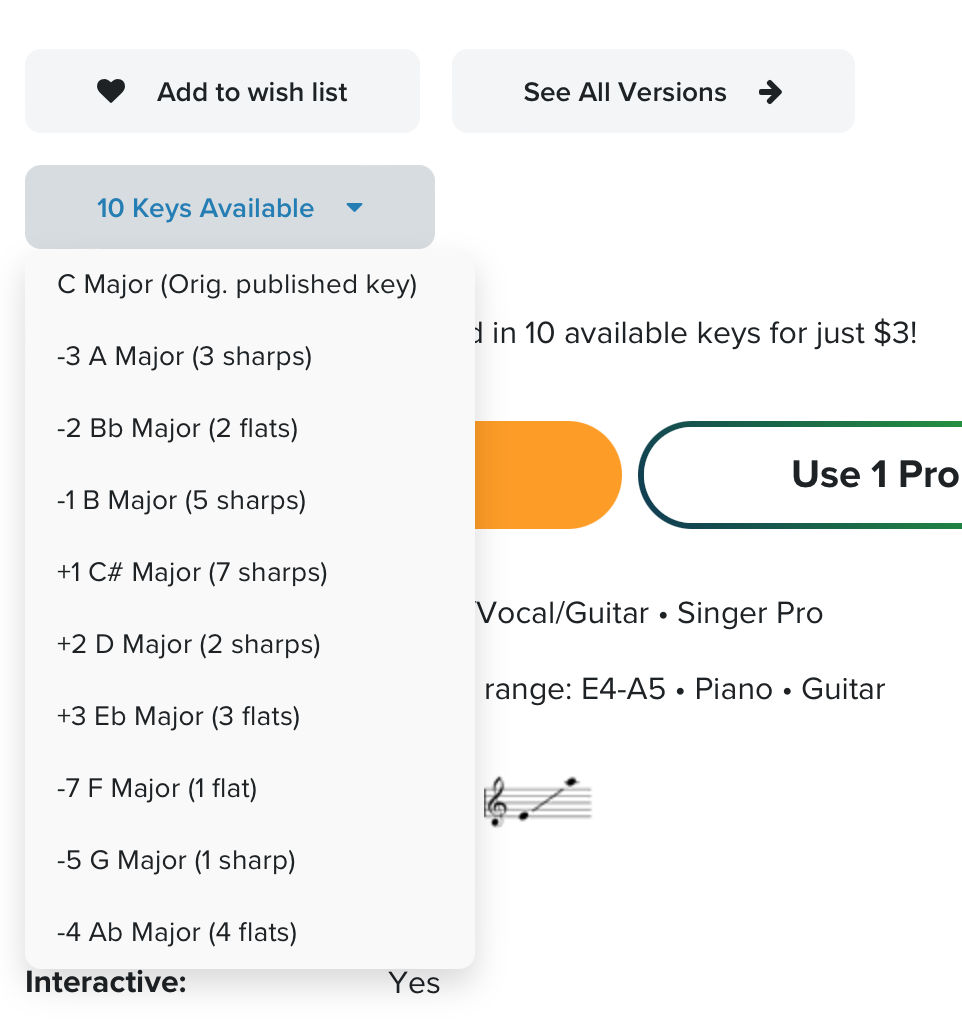
Look for a button that says something like “10 keys available.” Tap or click it to open the list of keys.
You may see:
plus (+) numbers minus (–) numbers letters, sharps, or flatsYou do not need to understand these terms.
Keys with a plus (+) are higher than the original key Keys with a minus (–) are lower than the original keyWhat to do:
choose one option listen to the preview sing along notice how your voice respondsYou are looking for the version that feels the most comfortable overall. It does not need to feel perfect.
If you are unsure, choose the original published key at the top. That is always an acceptable choice.
What you’re seeing in the sheet music
Before purchasing, you will only see the first page of the sheet music. This is normal.
On that page, you will usually see:
Guitar chords — these symbols tell a guitarist which chords to play.
Melody + lyrics — this is the part you sing.
Piano accompaniment — this is what the pianist plays to support you.
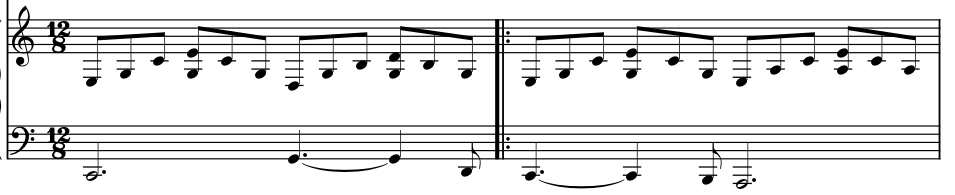
You do not need to read or understand this music. This preview is only to confirm that you chose the correct format.
If your sheet music looks similar to the examples shown here, you’ve done it correctly.


After purchasing
After purchasing, Musicnotes allows you to:
play the entire song from start to finish sing along using the full audio change keys if needed then print once you’ve chosen the best keyYou may also see something like “1 of 3.” This simply means you are previewing the first page. The remaining pages appear after purchase.
Nothing is missing.

Printing and preparing your sheet music
Students are responsible for preparing their own sheet music.
If you print your sheet music:
print single-sided only make sure nothing is cut off at the edges ensure all notes, lyrics, and page numbers are visibleWhat may look unimportant to you may be essential for the musician.
If your song is more than one page, tape the pages together in an accordion style.
Lay all pages out side by side with the music facing up. Join each page edge to edge using clear tape.
The pages should fold open accordion-style so the musician can move through the song without flipping pages.
Digital sheet music is acceptable on an iPad or tablet 10 inches or larger, where pages can be easily viewed and flipped.
Musicians cannot read sheet music from a phone.
Important reminders
Do not email or send sheet music in advance.
Bring all sheet music with you on the day of your session.
You do not need to prepare perfectly. You do not need to understand the music. You only need to bring it.
If your Musicnotes screen matches what’s described in this guide, you are fully prepared.
Performance Lab
The first and third Wednesday of each month, 7:00–8:30pm, in person at the home studio (no Labs in July and August). Ninety minutes, up to four people. Bring one piece ready to run.
One piece, four minutes maximum: something you’re already working on, love, or already know. Keep it simple — this is about exploration, not perfection.
Guitarists: bring your own with a patch cable for my Bose speaker, or use mine.
Memorization is recommended but not mandatory. Perform the entire piece — don’t stop early. This isn’t an audition: I just want to hear your voice, your story, or your delivery.
On the dayThis is a private residence near Woodbine & Mortimer (just north of the Danforth). The Lab begins promptly at 7:00pm.
Want help getting ready? Book a private session ahead of time.
BTW — if you’re nervous, don’t worry. There’s no need to be perfect. Just do your best!
One piece, four minutes maximum: something you’re already working on, love, or already know. Keep it simple — this is about exploration, not perfection.
Memorization is recommended but not mandatory. Perform the entire piece — don’t stop early. This isn’t an audition: I just want to hear your voice, your story, or your delivery.
On the dayThis is a private residence near Woodbine & Mortimer (just north of the Danforth). The Lab begins promptly at 7:00pm.
Want help getting ready? Book a private session ahead of time.
BTW — if you’re nervous, don’t worry. There’s no need to be perfect. Just do your best!
Moving your Lab
- You can move your Lab to another date yourself from My bookings
- If the Lab you want is full, book the next one with space and join the waiting list: if a place opens, you’re moved automatically
- Performance Lab bookings may be rescheduled with 24 hours’ notice. With less than 24 hours’ notice, the booking is forfeited. Lab bookings are non-refundable.
In the room
- Adults, 18 and up. No spectators, please
- To minimize distractions, please don’t bring children or toddlers into the session
- You may record your own turn. Never record anyone else’s without their permission
Singing Lessons
Bring songs and a notepad. Everything you need is below, grouped by topic.
Prepare for your very first session
- 2× 3–4 min songs to sing, varied in tempo and/or genre
Pick songs
- a) you’re already working on
- b) you love, and/or
- c) you already know. Keep it simple!
Bring to the first session
- Karaoke or instrumental tracks on YouTube or MP3
- Optional: email links or MP3s to carolyn@vocaleuphoria.com
- If you play, you may bring your own guitar or use mine.
Things to know
- No lead voice on background tracks (backup singers are fine)
- Memorization is recommended but not mandatory
- Sing the entire song — don’t stop early
- Please time your songs so you don’t go overtime
- This is NOT an audition — I just want to hear your voice
Bring to every session
- Pen + notepad
- Personal recorder/cell phone for specific exercises (No, you do not have permission to record entire sessions.)
In Person
- This is a private residence near Woodbine & Mortimer (just north of the Danforth)
- Please arrive exactly at your time — no waiting area
- Students are booked back-to-back; if early, come to the door only at your time
- Under 18: please attend the first visit with one parent/guardian
- We’ll sit and chat briefly until your child is comfortable to proceed
- If your child prefers, you may stay, but one-on-one lessons work best without distractions
- No spectators please
- Adult students: to minimize distractions, please do not bring children/toddlers into the session; if needed, reschedule
Online
- Use a laptop or desktop computer. The bigger the screen, the better.
- Find a private, quiet, secluded space with good lighting where you can sit as well as stand
- Keep webcam in one place — do not hold laptop, iPad, etc. in your hands
Let’s avoid interruptions and minimize distractions
- Test your webcam, sound, and mic prior to the session
- Ask other people in your household not to disturb you
- NO SPECTATORS on or off camera please
- Lessons are on Google Meet. If your Meet has Noise cancellation (Settings → Audio), turn it off so your voice sounds natural. On a Mac, set the microphone to Standard, not Voice Isolation.
Moving your session
- You can move your session to another date yourself from My bookings
- Private lessons, duo coaching and consultations may be rescheduled with 24 hours’ notice. With less than 24 hours’ notice, the session is forfeited. Cancelled sessions are non-refundable. No exceptions. — see the cancellation policy.
Public Speaking Lessons
Bring your material and a notepad. Everything you need is below, grouped by topic.
Prepare for your very first session
- 1× 4-min max speech, pitch, presentation, poem or monologue to present.
Choosing your material
- a) you already know
- b) you feel connected to, and/or
- c) you want to improve
- Keep it simple — the goal is to hear your natural speaking voice.
- This is NOT an audition — I just want to hear your voice
Bring to the first session
- Printed or digital copies of your material, if needed
Things to know
- Memorization is recommended but not mandatory
- Timing is important so we don’t go overtime
Bring to every session
- Pen + notepad
- Personal recorder/cell phone for specific exercises (No, you do not have permission to record entire sessions.)
In Person
- This is a private residence near Woodbine & Mortimer (just north of the Danforth)
- Please arrive exactly at your time — no waiting area
- Students are booked back-to-back; if early, come to the door only at your time
- Under 18: please attend the first visit with one parent/guardian
- We’ll sit and chat briefly until your child is comfortable to proceed
- If your child prefers, you may stay, but one-on-one lessons work best without distractions
- No spectators please
- Adult students: to minimize distractions, please do not bring children/toddlers into the session; if needed, reschedule
Online
- Use a laptop or desktop computer. The bigger the screen, the better.
- Find a private, quiet, secluded space with good lighting where you can sit as well as stand
- Keep webcam in one place — do not hold laptop, iPad, etc. in your hands
Let’s avoid interruptions and minimize distractions
- Test your webcam, sound, and mic prior to the session
- Ask other people in your household not to disturb you
- NO SPECTATORS on or off camera please
- Lessons are on Google Meet. If your Meet has Noise cancellation (Settings → Audio), turn it off so your voice sounds natural. On a Mac, set the microphone to Standard, not Voice Isolation.
Moving your session
- You can move your session to another date yourself from My bookings
- Private lessons, duo coaching and consultations may be rescheduled with 24 hours’ notice. With less than 24 hours’ notice, the session is forfeited. Cancelled sessions are non-refundable. No exceptions. — see the cancellation policy.
Duo Coaching
Two of you, one session. Decide beforehand what you are singing together.
Prepare for your very first session
- 2× 3–4 min songs total
- Option A: both of you sing the 2 songs together
- Option B: each person sings 1 solo song
Pick songs
- a) you’re already working on
- b) you love, and/or
- c) you already know. Keep it simple!
Bring to the first session
- Karaoke or instrumental tracks on YouTube or MP3
- Optional: email links or MP3s to carolyn@vocaleuphoria.com
- If either of you plays, you may bring your own guitar or use mine.
Things to know
- No lead voice on background tracks (backup singers are fine)
- Memorization is recommended but not mandatory
- Sing the entire song — don’t stop early
- Please time your songs so you don’t go overtime
- This is NOT an audition — I just want to hear your voices
Bring to every session
- Pen + notepad
- Personal recorder/cell phone for specific exercises (No, you do not have permission to record entire sessions.)
In Person
- This is a private residence near Woodbine & Mortimer (just north of the Danforth)
- Please arrive exactly at your time — no waiting area
- Students are booked back-to-back; if early, come to the door only at your time
- Under 18: please attend the first visit with one parent/guardian
- We’ll sit and chat briefly until your child is comfortable to proceed
- If your child prefers, you may stay, but private lessons work best without distractions
- No spectators please
- Adult students: to minimize distractions, please do not bring children/toddlers into the session; if needed, reschedule
Online
- Use a laptop or desktop computer. The bigger the screen, the better.
- Duo Coaching is available online, together in one room or from two places.
- Find a private, quiet space with good lighting where both of you can sit as well as stand.
- Keep the webcam in one place — do not hold a laptop, iPad, etc. in your hands.
- Test your webcam, sound, and mic prior to the session.
- Ask other people in your household not to disturb you.
- No spectators on or off camera please.
- Lessons are on Google Meet. If your Meet has Noise cancellation (Settings → Audio), turn it off so your voice sounds natural. On a Mac, set the microphone to Standard, not Voice Isolation.
Moving your session
- You can move your session to another date yourself from My bookings
- Private lessons, duo coaching and consultations may be rescheduled with 24 hours’ notice. With less than 24 hours’ notice, the session is forfeited. Cancelled sessions are non-refundable. No exceptions. — see the cancellation policy.